
A posture reminder that goes by your shoulders, not a timer
A timer reminds you whether you need it or not. The alert in TrackMyPosture works from your webcam instead: it watches the line between your shoulders in your browser and makes a sound when that line tilts more than 3°.
How to turn it on
Alerts are off by default. To turn them on, start a session on the analyse screen, then:
- Click the speaker icon under the video.
- Switch on Enable Sound, then Shoulder Posture.
- Choose a sound (Soft, Beep, Chime or Bell) and a volume. Test lets you hear it first.
- Choose how often it may sound: every 1, 5, 10 or 15 minutes. The default is 5.
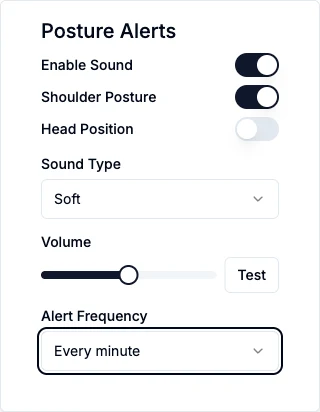
We would start with the shoulder alert alone. The Head Position alert is much more sensitive and goes off nearly all the time.
When it sounds
There are two triggers:
- your shoulders tilt more than 3°
- the camera can't see one of your shoulders clearly, which also happens when you lean out of the picture
The interval you chose is a limit, not a schedule. With level shoulders in view, it stays quiet.
We tested this with a stock photo played through a fake camera, with the alert set to every minute. With the picture tilted by 7°, the alert sounded straight away and again 60 seconds later. With the shoulders level, at 2.2°, it stayed silent for the 25 seconds we watched.
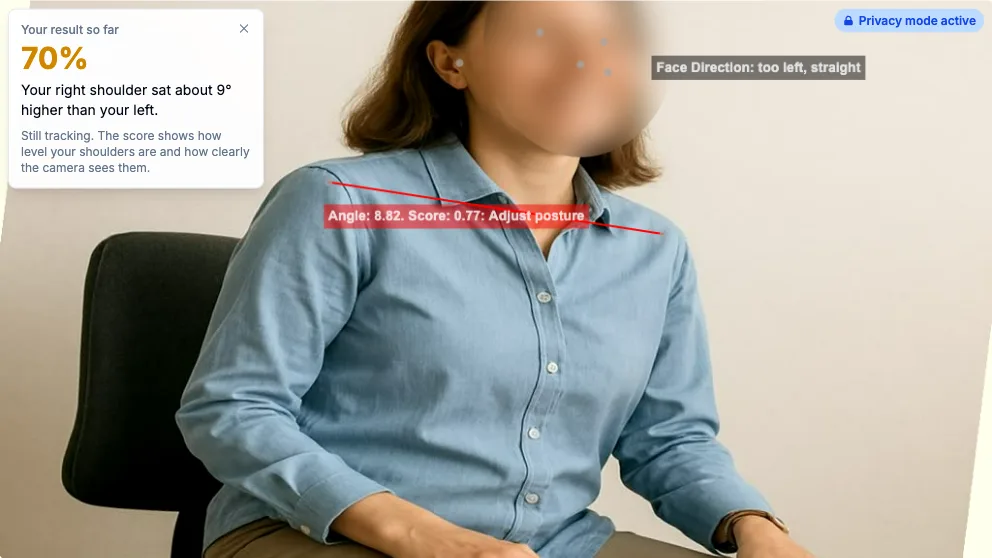
The tilted test picture, with the face blurred by privacy mode.
What it won't do
- It only makes a sound. There is no desktop notification.
- It only works during a session. The tab has to stay open with the camera on. Close it and the reminders stop.
- It only sees sideways tilt. The camera looks at you from the front, so leaning in with level shoulders won't set it off. Neither will a rounded back.
- It can't tell your shoulders from your laptop. A tilted screen or camera looks like tilted shoulders, so face the camera straight on.
Your video stays on your device while this runs. About once a minute your account saves a row of numbers, and nothing else from the camera.
What it costs
The alert is on every plan, but the free plan's 45 minutes a month come to about 2 minutes per working day. That is enough to try it. For a reminder through the working day you would need Pro, which is $6.99 a month or $39 a year. See the pricing page.
To see what the camera sees before you create an account, try the free posture check. For the measurements behind the alert, read what the posture analysis app measures.